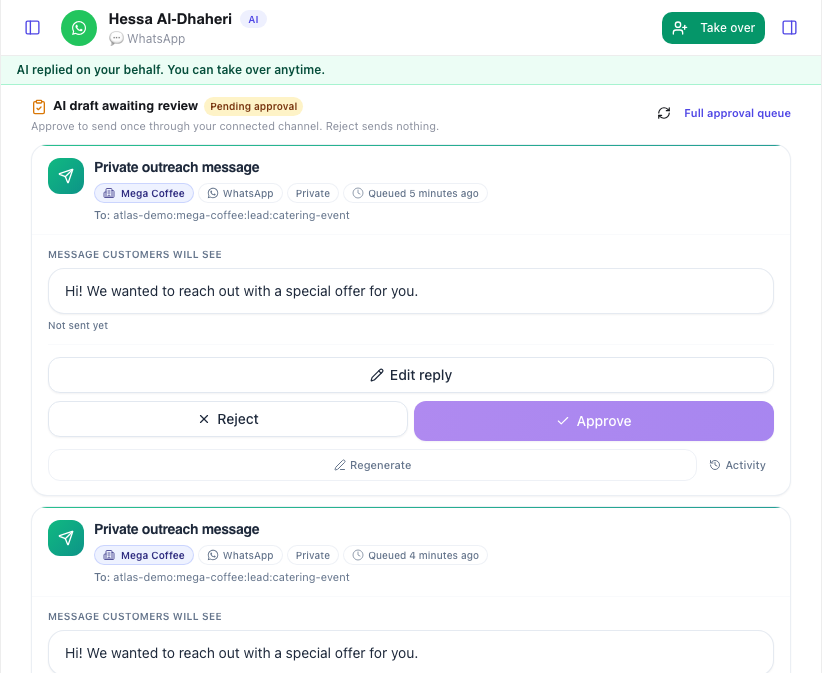

Control customer conversations across channels—with approvals built in.
One workspace for approved AI replies, safe routing, and human handoff when it matters.
Four pillars that drive conversion
Clear value, low risk, and a product story you can explain fast.
AI drafts replies using your brand voice, FAQs, and policies—then escalates anything sensitive to humans.
A compact memory summary attaches to the customer, so replies stay consistent when they switch platforms.
Queues, assignments, and visibility so leaders can monitor outcomes and agents can move fast.
AI Call teams automate order confirmations. Bulk import CSV, track status, escalate when needed.
Turn public comments into private follow-ups and route interested buyers for approval.
Core features
Built to feel enterprise on day one—without complexity.
One place to review conversations, drafts, and handoffs across WhatsApp, Instagram, and Facebook.
- Single thread per customer
- Fast search + filters
- Audit-friendly visibility
Automatically reply to comments on your Instagram and Facebook posts. AI drafts replies using your brand voice—same inbox, same rules.
- Instagram & Facebook post comments
- AI-drafted replies with memory
- Managed from the unified inbox
Detect sensitive intent and route to the right team before brand risk happens.
- Refund + complaint signals
- VIP routing and SLAs
- Optional approvals
Show response time, deflection rate, and escalations in a stakeholder-friendly dashboard.
- AI resolution rate
- First response time
- Escalation volume
Upload files (PDF, DOC, TXT), add website URLs, or manage FAQs with categories. The AI uses this context when drafting.
- Files, websites, social
- FAQ management
- Categories + tags
Manage FAQs with categories and tags. The AI references these when drafting replies so responses stay accurate.
- Add, edit, delete FAQs
- Search and filter
- Usage stats
AI Call teams automate confirmations. Bulk import CSV, track Total/Confirmed/Pending/Escalated.
- Twilio/Vonage
- Bulk import
- Initiate call
From founder inbox to support org
Keep control as you scale: routing, roles, and visibility that stakeholders trust.
- AdminRole
Control tone, policies, and channels
- Team leadRole
Monitor queues and quality
- AgentRole
Edit drafts and reply fast
Setup in minutes
Connect channels and start with demo flows.
Fast first reply
Drafts appear instantly for common questions.
Safety by default
Escalate risky topics before sending.
Clear governance
Roles and approvals where it matters.
Integrations + channels
Start with the essentials. Add more channels when you're ready.
Instagram DMs
Facebook Messenger
AI Call (Twilio/Vonage)
Webhooks
Templates
Queues
FAQ
Answer objections before they become drop-offs.
How do I connect my accounts?+−
Connect WhatsApp, Instagram, and Messenger from your dashboard in a few steps. We use official Meta integrations—no technical setup required. Your team can go live in minutes.
How do handoffs work?+−
You define escalation triggers (refunds, angry sentiment, VIP customers, etc.) in the AI Config and team settings. When triggered, the conversation routes to the right queue in the Escalations workspace. Humans can reply from the unified inbox with full context.
Can I control tone and compliance?+−
Yes. The system prompt and response policies are centralized in AI Config. Each team can have its own tone (Professional, Friendly, Casual). You can enforce safe replies and require approval for certain categories before sending.
Do you store customer data?+−
We store only what's needed to reply and remember context (e.g. conversation summaries). Account owners can request data export or deletion from workspace settings. We're designed for business use and take privacy seriously.
How do I train the AI with my content?+−
Use the AI Training workspace to upload files (PDF, DOC, TXT, CSV, JSON), add website URLs for crawling, or connect social media URLs. The Knowledge Base lets you add FAQs with categories and tags. The AI uses this context when drafting replies.
What is the Knowledge Base?+−
The Knowledge Base is your FAQ management hub. Add questions and answers with categories (General, Product, Pricing, Support, Shipping, Returns) and tags. The AI references these when drafting replies so responses stay accurate and on-brand.
What are order confirmation calls?+−
Create an AI Call team to automate order confirmations. Bulk import orders via CSV or add them manually. The AI calls customers to confirm orders, and you can track status (Confirmed, Pending, Escalated) in the Orders workspace. Supports Twilio and Vonage.
How does the escalation workflow work?+−
Escalations can be AI-to-human (when the AI detects sensitive intent) or team-to-team (when an agent needs specialist help). In the Escalations workspace, you Accept, Reject, or Mark Resolved. All activity is visible for audit and SLA tracking.
How do I connect WhatsApp, Instagram, and Messenger?+−
In your dashboard, go to Integrations and click Connect for each platform. Sign in with your Meta account, choose your WhatsApp number or Instagram/Messenger account, and you're done. We manage security and renewals for you.
What happens when the AI is unsure?+−
When the system isn't confident, the conversation goes to your team. You can edit the draft, send your own reply, or hand off to a colleague. You're always in control—nothing goes out without your approval when you want it.
Is this safe for my business?+−
Yes. We use official Meta integrations, run on secure infrastructure, and don't use fake or risky automation. Your data is protected, and you control what gets sent. Built for serious businesses who care about reputation and compliance.
Will customers know it's AI?+−
Replies use your brand voice and your FAQs—they read like you. You choose whether to disclose that you use automation. Many businesses don't; others add a short line. Either way, you control the tone and message.
Can I control or edit replies?+−
Yes. You can approve every reply before it goes out, or let the system send automatically for routine messages. You can edit drafts, set rules for when to escalate to a human, and turn automation off anytime. Full control.
What if the AI makes a mistake?+−
You can require approval before sending so nothing goes out without a human check. For automatic replies, you set the rules and tone—and sensitive topics (refunds, complaints) are routed to your team. If something slips through, you can correct it and tighten rules. We're built for safe handoff.
Is this officially integrated with Meta?+−
Yes. We use Meta's official APIs for WhatsApp Business, Instagram, and Messenger. No workarounds or unofficial tools. That means reliable delivery, compliance with platform rules, and safe use for your business.
Do you reply to comments and move interested customers into private follow-ups?+−
Yes. LUMORQ replies to Instagram and Facebook comments. When buying intent is detected, the conversation moves into private follow-ups for your team’s approval—nothing is sent without review. Full audit trail and role-based access are included.
Turn Every DM Into Revenue—Starting Today
Auto-reply on WhatsApp, Instagram & Messenger in under 60 seconds. Your brand voice, zero missed leads.
Every unanswered message is a sale walking away—start free in minutes.