

Operating loop
From attention to next action in one loop
LUMORQ helps teams know what needs attention, progress work with AI Employees and context, and keep humans in control through review or configured automatic execution.
Default execution mode is manual. Automatic mode is an explicit policy choice — not the product’s default story.
one loop
1/4Communication Hub
Omnichannel Inbox
Handle every customer channel in one governed inbox
How human approval and control work
LUMORQ keeps humans in control of outbound customer work. The default is review before execution. Teams may configure automatic execution only where policy allows — still inside gate, StateMachine, and audit. It is never unrestricted auto-send.
Manual (default)
AI Employees prepare governed drafts. A human reviews, edits, approves, or rejects before anything is queued to send.
Configured automatic
Where you explicitly enable it, eligible actions can execute automatically — still constrained by policy, gate, and a full audit trail.
Governed path
OutboundAction → StateMachine → Gate → Executor. No bypass paths to Meta.
Governed drafts
Inbox queue
Attention → Context → Progress → Control
The customer operating loop — with governance on outbound work.
Outbound governance path
No hidden sends. Every outbound action advances through the state machine before Meta.
Inbound
Conversations & events
Customer conversations and supported channel events land in one operating model.
OutboundAction → StateMachine → Gate → Executor. No bypass paths.
Outbound actions follow a governed path. Default mode favors review before execution. Configured automatic execution still stays inside policy, gate, and audit — it is not unrestricted auto-send.
Communication Hub
Omnichannel Inbox
Handle every customer channel in one governed inbox
- Handle every customer channel in one governed inbox
- Answer website visitors with AI before they leave
- Reply to WhatsApp customers with AI inside the messaging window
- Qualify more customers using ai instagram dm auto-reply
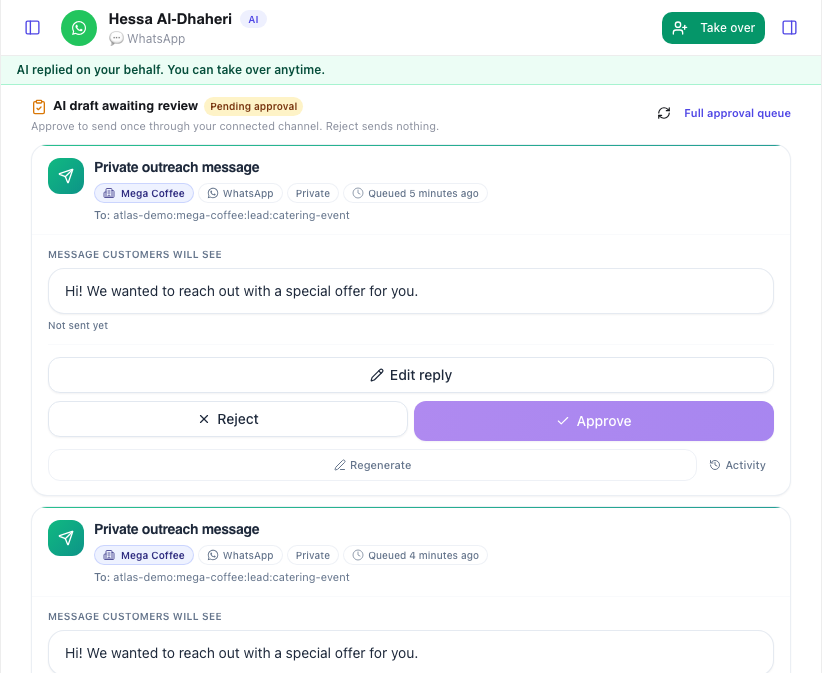
Governance in practice
Who approves what
Role-based control from day one admins set policy, leads own queues, agents release drafts.
Governance in practice
Admin
Connect channels, set execution mode, define escalation rules, and manage team permissions.
Workspace
Where teams work
The same modules you use after signup linked from setup to daily operations.
Workspace
Conversations
Review work, approve, edit, or escalate before customer-facing release when policy requires it.
Onboarding
Four workspace steps to start
Connect your channels, teach knowledge, set control policies, then run Today and conversation work in one workspace.
01
Connect channels
Link WhatsApp Business and Instagram Professional via Workspace → Integrations.
Continue exploring
See features, pricing, or walk through a live demo of the governed path.
Platform features
Customer jobs: attention, conversations, AI Employees, qualify & follow up, appointments, insight.
Questions about governed workflow
Approval, escalations, Meta APIs, and how outbound actions move through your workspace.
Set escalation triggers in AI setup and team settings. When matched, threads route to `/workspace/messages/escalations` with full context. Agents reply from `/workspace/messages/inbox` accept, resolve, or reassign without losing history.
Ready to operate customer work with AI Employees?
Request access to see how LUMORQ helps your team know what needs attention, progress work with context, and keep humans in control.
Built for service businesses and agencies across MENA.